Connect BrowserOS Neo
BrowserOS Neo is a web browser that other apps can control through its MCP server. Reelcraft uses it to:
- make text and images with your ChatGPT plan, in a ChatGPT tab you're signed in to;
- give Codex and Claude a browser for browser tasks;
- help you sign in when you connect Codex or connect Claude.
Neo is optional. Skip this page if you don't use ChatGPT, Codex or Claude with Reelcraft.
Before you start
- Install BrowserOS Neo on the same computer that runs Docker, and open it.
- In Neo, sign in to chatgpt.com if you want to use your ChatGPT plan.
- Make sure Neo's MCP server is on, and note its address. Neo shows it in its settings; it
normally ends in
:9010/mcp. See BrowserOS's own documentation if you can't find it.
Neo has to keep running while Reelcraft uses it.
Set the address in Reelcraft
Reelcraft runs inside Docker, so for Reelcraft, "your computer" is called
host.docker.internal, not localhost or 127.0.0.1.
-
In Reelcraft, open Settings. Find the BrowserOS Neo card.
-
Check the Neo MCP address. The default is:
http://host.docker.internal:9010/mcpIf Neo shows a different port or path, change the address to match it. Keep
host.docker.internalas the host name: for example, Neo'shttp://127.0.0.1:9100/mcpbecomeshttp://host.docker.internal:9100/mcp. -
Click Test connection. You see Connected to BrowserOS Neo. when it works.
-
If you changed the address, click Save.
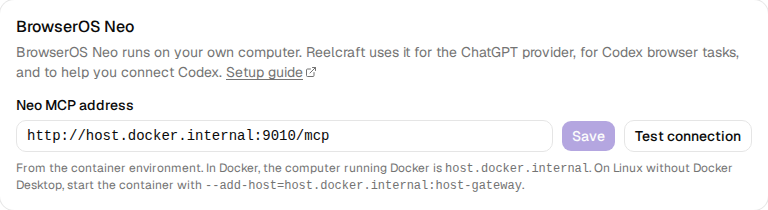
The line under the address says where it comes from. On a new install it says From the
container environment: the Reelcraft image sets the default address through the
CODEX_BROWSER_OS_URL environment variable. After you click Save, it says Saved in
Settings, and the saved address is used instead. Click Reset to go back to the default.
Saving the address also tells Codex where Neo is, so Codex browser tasks use it too. Claude browser tasks always use the saved address.
Linux without Docker Desktop
With Docker Engine, host.docker.internal only works if the container was started with
--add-host=host.docker.internal:host-gateway (see Run Reelcraft). If you
started it without that option, recreate the container
with it, using the same volume.
Neo's MCP server must also accept connections from Docker's network, not only from 127.0.0.1.
If Test connection fails, see Troubleshooting.