Defaults
Defaults save you from setting the same thing on every stage. You can set them in two places:
- On a channel: they apply to every blueprint in the channel. Open the channel's More menu, select Edit, and scroll to Defaults.
- On a blueprint: they apply to every stage in that blueprint. They're under Defaults in the Blueprint tab on the blueprint's canvas. Like any other blueprint change, they're part of the version you save.
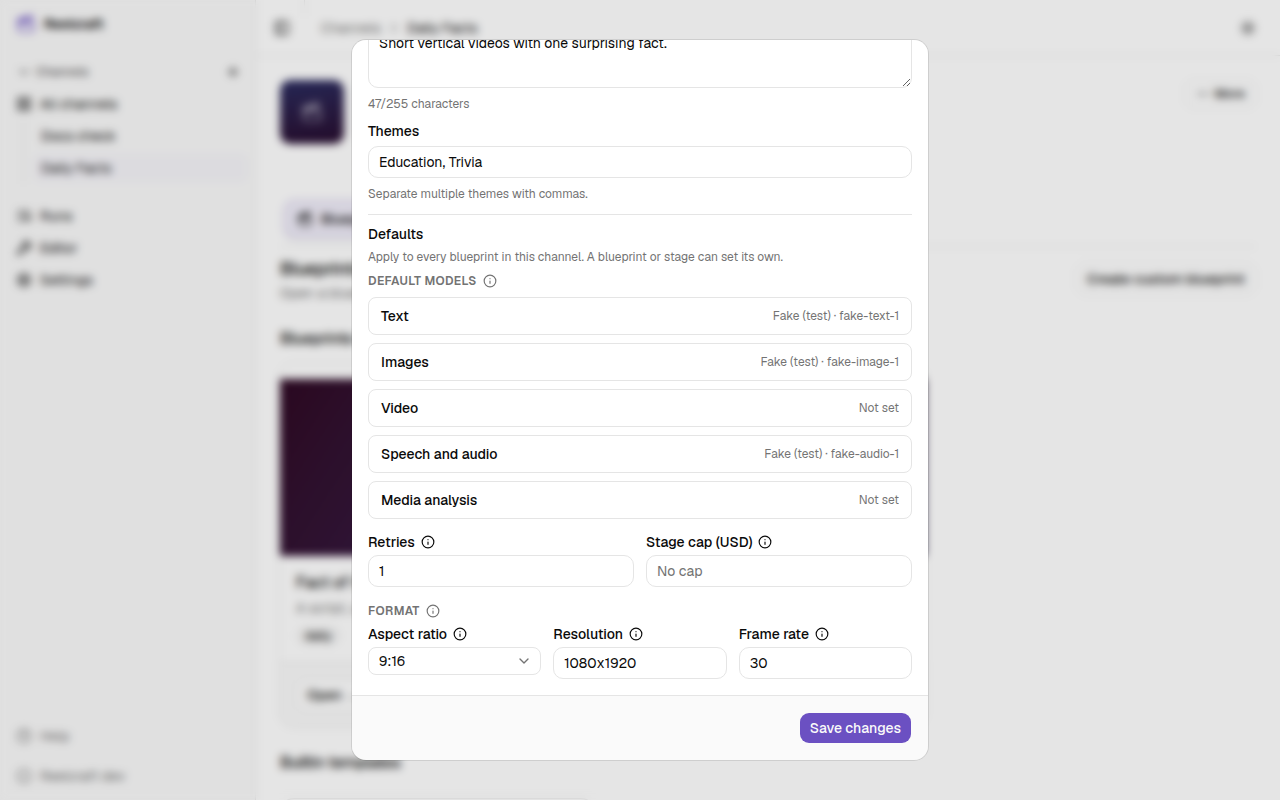
What you can set
Default models
Pick a model for each kind of work. A stage that doesn't pick its own model uses the default for its kind:
| Default | Used by stages of this type |
|---|---|
| Text | Generate Text |
| Images | Generate Image |
| Video | Generate Video |
| Speech and audio | Generate Speech |
| Media analysis | Analyze Media |
Select a kind to open its picker, then choose a Provider and Model. The row shows Not set until you pick a provider. To clear a default, set its provider back to Select a provider…. See Models for the picker itself.
The quality control judge doesn't use these defaults. Each stage's quality control picks its own judge model. See Quality control.
Retries
How many times a stage tries again automatically after it crashes, for example when a provider returns an error or times out. Empty means 0. Failed checks, quality control rejections and your own rejections never use these retries. See Retries.
Stage cap (USD)
The most each stage may spend in one run. If a stage's next model call would go over it, the run pauses as Paused Budget until you raise the cap. Empty means no stage cap: only the run's own cap applies. See Budget and costs.
Format
- Aspect ratio: 9:16, 16:9, 1:1 or 4:5. Timelines are checked against it, so a vertical channel catches a landscape timeline. See Timeline checks.
- Resolution: width × height in pixels, such as
1080x1920. A value in the wrong shape shows Use width x height, like 1080x1920. and isn't saved. - Frame rate: frames per second, such as
30.
The resolution and frame rate set the size of the timeline when you edit it by hand. If they're empty, the timeline takes them from the first video clip, or uses 1080×1920 at 30 fps.
What wins
When the same setting is set in more than one place, the most specific one wins:
- The stage's own setting, in its inspector.
- The blueprint's Defaults.
- The channel's Defaults.
- Reelcraft's built-in default: no model, 0 retries, no stage cap.
So a channel can say "write with model A", one blueprint can say "write with model B", and one stage in that blueprint can still pick model C.
A stage that's left empty shows what it will get. In the stage inspector (the Stage tab):
- an empty Retries box shows the inherited value, for example Default (2);
- an empty Stage cap (USD) box shows the inherited cap, or No cap;
- a stage without a model says which default it will use, for example No model set here, so it uses the default: OpenRouter · ….
Defaults are read when a run starts. A run that's already going keeps the settings it started with, even if you change the defaults while it runs.