Stages
A stage is one step of a blueprint: write a script, make an image, record speech, ask you to review something, and so on. Select a stage's card on the canvas to open its inspector in the Stage tab. The top shows the stage's label, key and type. Basics, Data and Flow control are open to start with; the others open when you select them, and each closed section says on its header what the stage has set there. Any problems with the stage are listed at the top, and next to the setting they're about.
Hover over the ⓘ next to any setting for a short explanation.
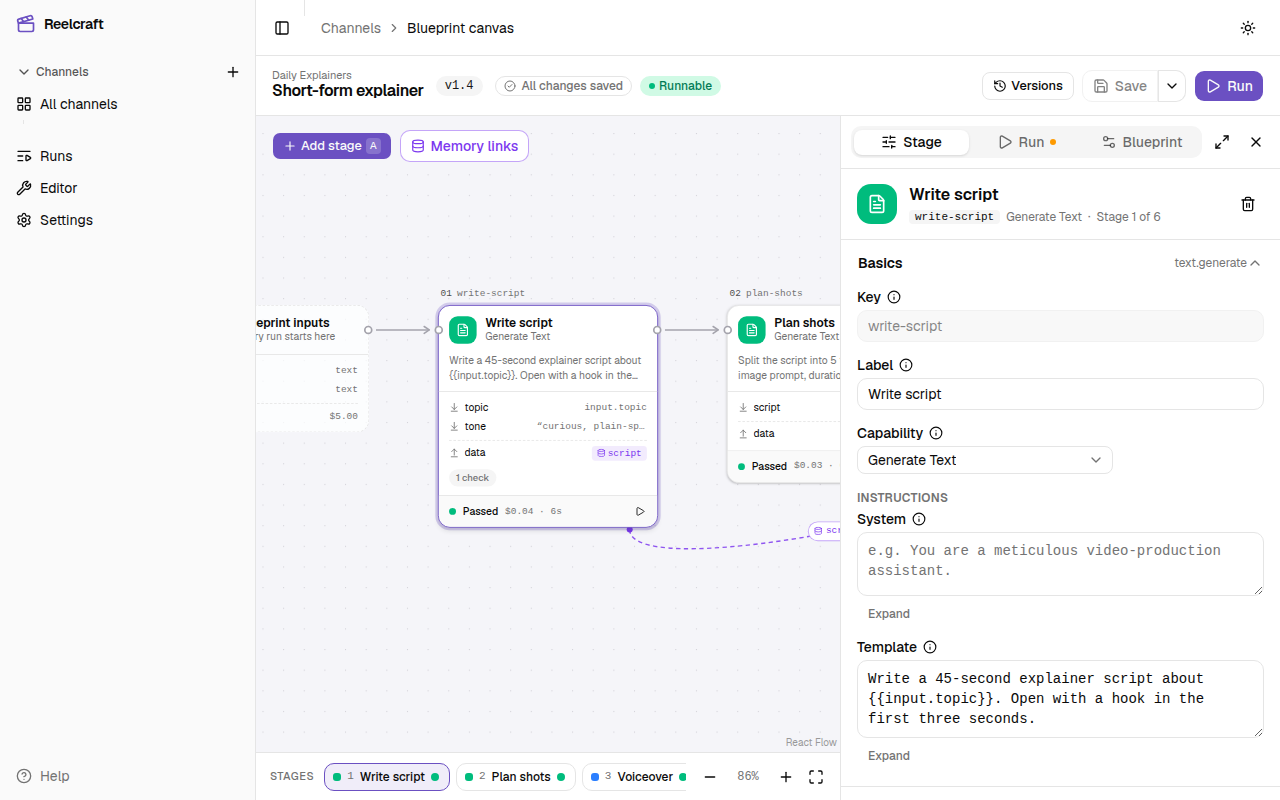
Basics
- Key: the stage's id, such as
stage-3. It's set when the stage is added and can't be changed. Runs, logs and other stages refer to the stage by its key. - Label: the name shown on the canvas and in runs. Change it to something meaningful, such as "Write script". It doesn't affect what the stage does.
- Phase: optional. The run page groups stages that share a phase name, such as Voice, into one box. Leave it empty and the stage gets a box of its own. It doesn't affect what the stage does, and changing it never makes a stage stale.
- Capability: the stage type, such as Generate Text or Render Timeline. The type decides which slots, settings and outputs the stage has. Changing it on a stage you've already set up asks first (Change this stage's capability?), because it clears the stage's Config and Slots. Select Keep current to cancel.
- Instructions: the prompt, in two boxes, System and Template. See Prompts.
- Config: settings that belong to the stage type, such as a render's quality. Not every type has any. See each stage type's page.
Data (slots, context)
Where the stage's inputs come from: the previous stage, an earlier stage through memory, the run's inputs, an asset, a character or a fixed value.
- Slots are the inputs the stage type expects, such as
textfor Generate Speech orclipsfor Concatenate Video. Each shows whether it's required, and whether it takesonevalue ormany. - Context is extra values you add yourself and use in the prompt.
See Connecting stages.
Output & memory writes
- Output: what the stage makes, such as
text,dataormedia.image. See Outputs. - Output instructions (Generate Text only): extra guidance on the content and style of the output.
- Memory writes: values from this stage's output to save for later stages. See Connecting stages.
Checks & Quality control
Ways to catch a bad output automatically, so the stage tries again before the run moves on:
- Checks: pass-or-fail tests, such as a word count. See Checks.
- Quality control: an AI model scores the output against criteria you write. See Quality control.
Model
The provider and model this stage uses. Leave it empty to use the blueprint's or the channel's default model for this kind of work. The inspector then names the default it will use. See Models.
Execution (retry, budget)
- Retries: how many times the stage tries again by itself after it crashes. Leave it empty to use the default, shown as Default (n).
- Stage cap (USD): the most this stage may spend in one run. When its next model call would go over, the run pauses as Paused Budget. Empty uses the default, or No cap.
- Quality control cap (USD): the most this stage's quality control judge may spend in one run. If the judge would go over it, the stage fails.
See Budget and costs.
Enabled when, Human approval, Iterate
Three optional extras, each added with its own button:
- Enabled when: run the stage only when a run input has a given value.
- Human approval: pause the run after this stage so you can approve or reject its output.
- Iterate: run the stage once for each item in a list, such as once per scene.
See Iterate, conditions and approval.
Three kinds of "try again"
A stage can try again for different reasons, and each reason has its own limit:
| Why it tries again | The limit | Set in |
|---|---|---|
| It crashed: the provider failed or timed out | Retries (or Item retry limit per item) | Execution (retry, budget), Iterate |
| Its output failed a check | Max check attempts | Checks & Quality control |
| Quality control scored it too low | Max attempts | Quality control |
When the output fails a check or quality control, the stage makes a new output with the reasons it failed added to its prompt, so the next attempt can fix them. A crash simply tries the same request again.
Rejecting an output yourself in Human approval doesn't use any of these limits.